
Build Online Form: The Simple Guide to Starting and Scaling

Why You Should Build Online Form Solutions Today
In 2026, the bridge between a visitor and a customer is almost always a digital form. When you build online form tools for your website, you stop chasing people and start collecting organized data. Whether you are an employee, a teacher, or a small business owner, these forms handle the work while you sleep.
Google Forms is the best starting point because it is free, reliable, and integrates directly with your Google account. Let’s look at three essential ways to use it.
Demo 1: Lead Capture for Home Repair Business
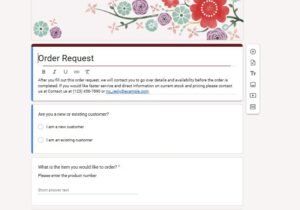
A lead capture form is your 24/7 salesperson. If you run a home repair service, you need to know what the problem is before you pick up the phone.
How to set it up:
-
Open Google Forms and choose the “Contact Information” template.
-
Add a Dropdown: Title it “Type of Repair” (Options: Plumbing, Electrical, Handyman, Other).
-
Add a Paragraph Box: Title it “Describe your issue.”
-
Enable File Upload: Ask for a photo of the repair area so you can give a better quote.
-
External Link: You can see how these templates look at the Google Forms Template Gallery.
Demo 2: Collecting Orders (T-Shirts or Products)
If you are selling items like T-shirts or event kits, you need to collect specific details like size and delivery address.
How to set it up:
-
Choose the “Order Form” template.
-
Product Selection: Use “Multiple Choice” or “Checkboxes” for items.
-
Details: Add a short answer field for “Quantity” and “Size.”
-
Shipping: Include a required section for “Delivery Address.”
-
Payment Note: Since Google Forms doesn’t have built-in checkout, add a description at the bottom: “We will email you a PayPal or Stripe invoice once we receive your order.”
Demo 3: Quick Feedback Surveys
To grow your business, you need to know what your customers think. A quick 3-question survey can give you the insights you need to improve.
How to set it up:
-
Start a Blank Form.
-
Scale Question: Use “Linear Scale” (1 to 5) for “How satisfied were you with our service?”
-
Open Question: Use “Paragraph” for “What is one thing we could do better?”
-
Referral Question: Use “Multiple Choice” for “Would you recommend us to a friend?” (Yes/No).
The “Ceiling” of Free Forms
While you can build online form solutions for free, you will eventually face problems that Google Forms can’t solve:
-
Double Bookings: Two people can pick the same time slot because the form doesn’t check your calendar.
-
Payment Friction: Customers prefer to pay instantly rather than waiting for an invoice.
-
Basic Design: It’s hard to make a free form look like a high-end, professional brand.
Let Us Create a Professional Booking Site for You
If your business is ready to move past basic spreadsheets, you need a site that works for you. Need Appointment Booking Site can build a custom platform that prevents double-bookings, takes payments automatically, and looks beautiful on any device.
Ready for a professional upgrade? Contact Us: Need Appointment Booking Site WhatsApp Us: +8801679502830 Email: rahman22ts@gmail.com